Create Custom Services



Services, also referred to as managers, are background processes that run independently on the device, each managed by the Salt minion parent process. If a service fails, the Salt minion automatically restarts it and reports the error.
The default services included with an AutoPi device serve as the primary communication layer between the Core software and the corresponding hardware components. This architecture makes services the ideal place to implement operations that are tightly coupled to specific hardware on the device.
Built-in Services
The following services are available by device type:
| Service | Description | Available On |
|---|---|---|
acc_manager | Manages the accelerometer hardware and provides access to motion and orientation data. | AutoPi TMU CM4, AutoPi CAN-FD Pro |
audio_manager | Controls audio output on the device, such as playing sounds or alerts. | AutoPi TMU CM4, AutoPi CAN-FD Pro |
cloud_manager | Handles buffering of data, and sending data in batches to the cloud server. | AutoPi TMU CM4, AutoPi CAN-FD Pro |
modem_manager | Manages the cellular modem, including connectivity, signal monitoring, and data sessions. | AutoPi TMU CM4, AutoPi CAN-FD Pro |
event_reactor | Listens for internal events fired by other services and triggers configured reactions in response. | AutoPi TMU CM4, AutoPi CAN-FD Pro |
obd_manager | Communicates directly with the STN chip to query vehicle data over the OBD-II interface. | AutoPi TMU CM4, AutoPi CAN-FD Pro |
spm_manager | Interfaces with the Smart Power Manager (SPM) to handle power states and wake-up logic. | AutoPi TMU CM4, AutoPi CAN-FD Pro |
gnss_manager | Manages the GNSS/GPS module and provides location and positioning data. | AutoPi TMU CM4, AutoPi CAN-FD Pro |
crypto_manager | Controls and holds the connection to the secure element. | AutoPi TMU CM4, AutoPi CAN-FD Pro |
can0_manager | Manages CAN interface can0 for CAN-FD communication workflows. | AutoPi CAN-FD Pro |
can1_manager | Manages CAN interface can1 for parallel or secondary CAN-FD communication workflows. | AutoPi CAN-FD Pro |
disk_housekeeper | Performs disk cleanup and housekeeping tasks to maintain healthy storage usage. | AutoPi CAN-FD Pro |
In addition to these built-in services, it is also possible to create fully custom services that run alongside the defaults on device boot. Custom services support PIP package requirements, giving you the flexibility to integrate third-party Python libraries as needed.
Creating a Custom Service
Ensure your device is up to date before proceeding. An outdated device may prevent module syncing from completing successfully.
- Navigate to the Services section and click Create.
- Fill in the required fields and click Save.
- The service and its associated custom module are now created.
- Navigate to the custom module to edit the code. See the examples below for reference.
- Sync the changes by clicking the Sync button, or restart the device — it will automatically pull the latest changes on boot.
- When prompted to restart the Salt minion process, click Yes. The service will not be loaded until the minion has restarted. You can also restart it manually using one of the following commands:
-
In the web terminal:
minionutil.restart -
Over SSH:
systemctl restart salt-minion
PIP Requirements
PIP requirements can be added to any custom code module as shown below:

Follow the standard requirements.txt format when specifying PIP dependencies.
Passing Settings Into the Service
To pass configuration into the service, set the Settings field to a valid JSON object:
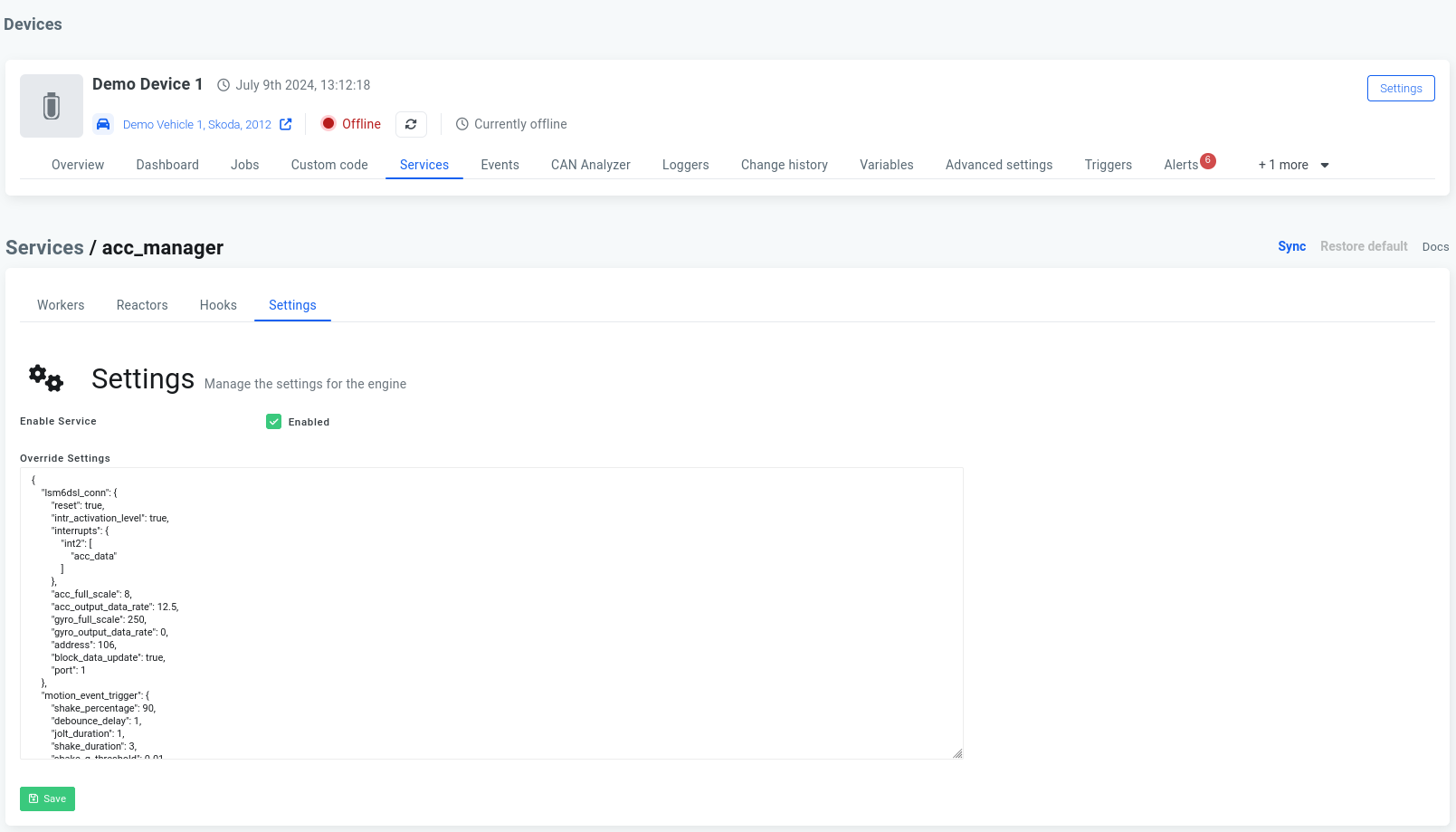
These settings are then accessible inside the service as follows:
some_setting = settings.get("some_setting", "default_value")
Examples
Log a Message Every 5 Seconds
The following example creates a service that writes "Hello World" to the log every 5 seconds.
import logging
import time

log = logging.getLogger(__name__)

def start(**settings):
    try:
        log.info("Starting SERVICE with settings: {:}".format(settings))

        while True:
            log.info('HELLO WORLD, anything new in the last 5 seconds?')
            time.sleep(5)

    except Exception:
        log.exception("Failed to start SERVICE")

        raise
    finally:
        log.info("Stopping SERVICE")

        # Stop everything, close connections etc.
With info level logging enabled on your device, you should see the message appearing in the log every 5 seconds.
The device log level can be adjusted in the advanced settings under System > Logging level.
Service With Cloud-Configurable Workers and Failure Event Reporting
import logging
import time

from common_util import factory_rendering
from messaging import EventDrivenMessageProcessor

log = logging.getLogger(__name__)

context = {
}

edmp = EventDrivenMessageProcessor("custom_service", context=context)

@factory_rendering
def start(**settings):
    try:
        log.info("Starting custom manager")

        context["settings"] = settings

        # Init the message processor
        edmp.init(__salt__, __opts__,
            hooks=settings.get("hooks", []),
            workers=settings.get("workers", []),
            reactors=settings.get("reactors", []))
        edmp.run()

        # Initialize stuff here

    except Exception as ex:
        log.exception("Failed to start custom manager")

        if settings.get("trigger_events", True):
            try:
                edmp.trigger_event({
                    "reason": str(ex),
                }, "system/service/{:}/failed".format(__name__.split(".")[-1]))
            except:
                log.exception("Unable to trigger service failed event")

        restart_delay = settings.get("restart_delay", 1)
        if restart_delay:
            log.info("Enforcing restart delay of {:} second(s)...".format(restart_delay))
            time.sleep(restart_delay)

        raise

    finally:
        log.info("Stopping custom manager")
        # Clean up
Subscribe to MQTT Topics
The following service subscribes to all MQTT topics and logs incoming messages. Add the following PIP requirement to the module before use:
paho-mqtt==1.5.0
Code:
import logging
import paho.mqtt.client as mqtt

log = logging.getLogger(__name__)

connect_results = {
    0: "Connection accepted",
    1: "The Server does not support the level of the MQTT protocol requested by the Client",
    2: "The Client identifier is correct UTF-8 but not allowed by the Server",
    3: "The Network Connection has been made but the MQTT service is unavailable",
    4: "The data in the user name or password is malformed",
    5: "The Client is not authorized to connect",
}

def on_message(mqttc, obj, msg):
    log.info(msg.topic + " " + str(msg.qos) + " " + str(msg.payload))

def on_subscribe(mqttc, obj, mid, granted_qos):
    log.info("Subscribed: " + str(mid) + " " + str(granted_qos))

def on_log(mqttc, obj, level, string):
    log.info(string)

def on_connect(mqttc, obj, flags, rc):
    result = "{:}: {:}".format(rc, connect_results.get(rc, "Unknown result code"))
    if rc == 0:
        log.info(result)
    else:
        raise Exception(result)

    try:
        mqttc.subscribe("#", qos) # Subscribes to all topics.
    except Exception as ex:
        log.exception("Exception occurred when setting up registers")

# glocal settings
qos = 0

def start(**settings):
    global qos

    usetls = True
    tlsVersion = None # will use most recent version
    cacerts = None

    port = 8883
    host = ""
    username = "username"
    password = "password"

    debug = False
    keepalive = 60

    # Setup
    mqttc = mqtt.Client(None, clean_session=True)
    if usetls:
        mqttc.tls_set(ca_certs=cacerts, certfile=None, keyfile=None, cert_reqs=ssl.CERT_REQUIRED, tls_version=tlsVersion)
    mqttc.username_pw_set(username, password)

    mqttc.on_message = on_message
    mqttc.on_connect = on_connect
    mqttc.on_subscribe = on_subscribe

    if debug:
        mqttc.on_log = on_log

    try:
        log.info("Starting MQTT engine")

        log.info("Connecting to {:} port: {:}".format(host, port))
        mqttc.connect(host, port, keepalive)
        mqttc.loop_forever(retry_first_connection=True)

    except Exception:
        log.exception("Failed to start MQTT engine")

        raise
    finally:
        log.info("Stopping MQTT engine")
        mqttc.disconnect()
For further reference on writing custom services (also referred to as engines):
 Shop AutoPi devices
 Compare devices
 Contact sales
 Contact support