Custom Code



Custom Code lets you extend your AutoPi device by writing Python modules that run directly on the device. You can use these modules to process vehicle data, call AutoPi Core functions, react to events, integrate with external systems, and run background services.
This guide explains how to create and deploy a module, how custom code maps to Salt, and how to work with Salt functions and manager context.
Before you begin
Keep the following points in mind:
- Custom Code is not supported on AutoPi Mini devices.
- A module belongs to either one device or one template.
- The module name must be unique within that device or template.
- The name cannot conflict with a built-in Salt module or an importable Python module.
- Creating a module does not activate it immediately. You must sync pending changes to the device.
Custom Code page
To open the Custom Code page, select a device in the AutoPi Cloud and go to Custom Code.
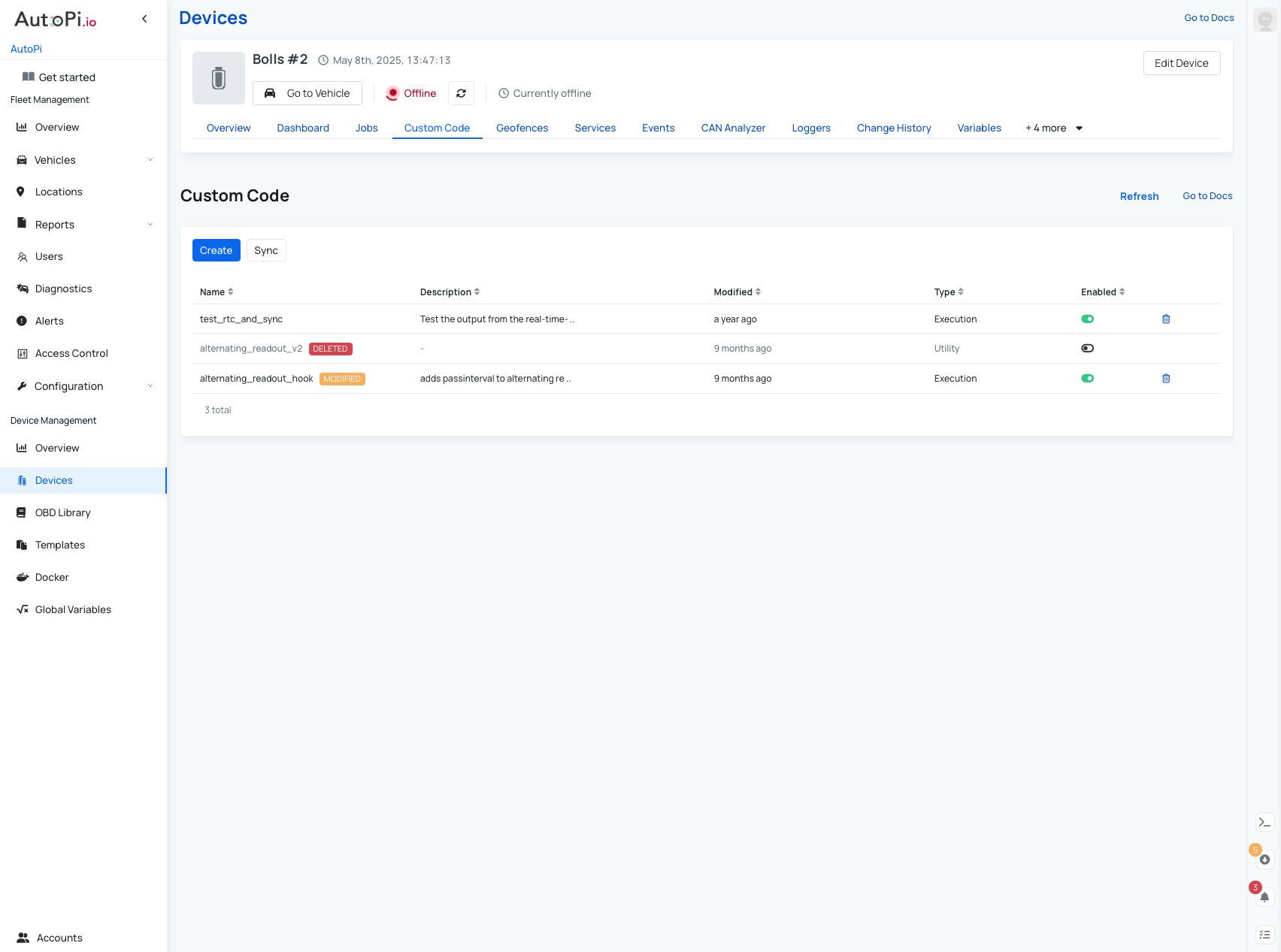
The page lists the modules configured on the device and these information:
| Field | Description |
|---|---|
| Name | Name used to identify and call the module. |
| Description | Optional explanation of the module's purpose. |
| Modified | Date and time of the latest change. |
| Type | How Salt loads and uses the module. |
| Enabled | Whether the module is deployed during synchronization. |
Use Refresh to reload the list and Sync to deploy pending changes. Select a row to edit a module, or select its trash icon to delete it.
Module types
Choose a type based on how the module will be used:
| Type | Use it for |
|---|---|
| Execution | Functions that can be called from the terminal, jobs, hooks, triggers, or other modules. |
| Utility | Shared helper functions imported by other Salt modules. |
| Returner | Functions that send results to a destination, such as the AutoPi Cloud or an external system. |
| Service | A long-running Salt engine for background processing. |
When you create an Execution, Utility, or Returner module, the editor provides a working example. Creating a Service module also creates a corresponding entry under Services, where you can configure workers, hooks, and reactors. Deleting the module also deletes that service entry.
Create and deploy a module
- On the Custom Code page, select Create.
- Enter a Name. Use only letters, numbers, and underscores (
^[a-zA-Z0-9_]+$). - Optionally, enter a Description.
- Select the appropriate module Type.
- Turn on Enabled if the module should be deployed during the next synchronization.
- Add your Python code.
- Optionally, add one pip requirement per line under Requirements.
- Select Save.
- Sync the changes to the device.
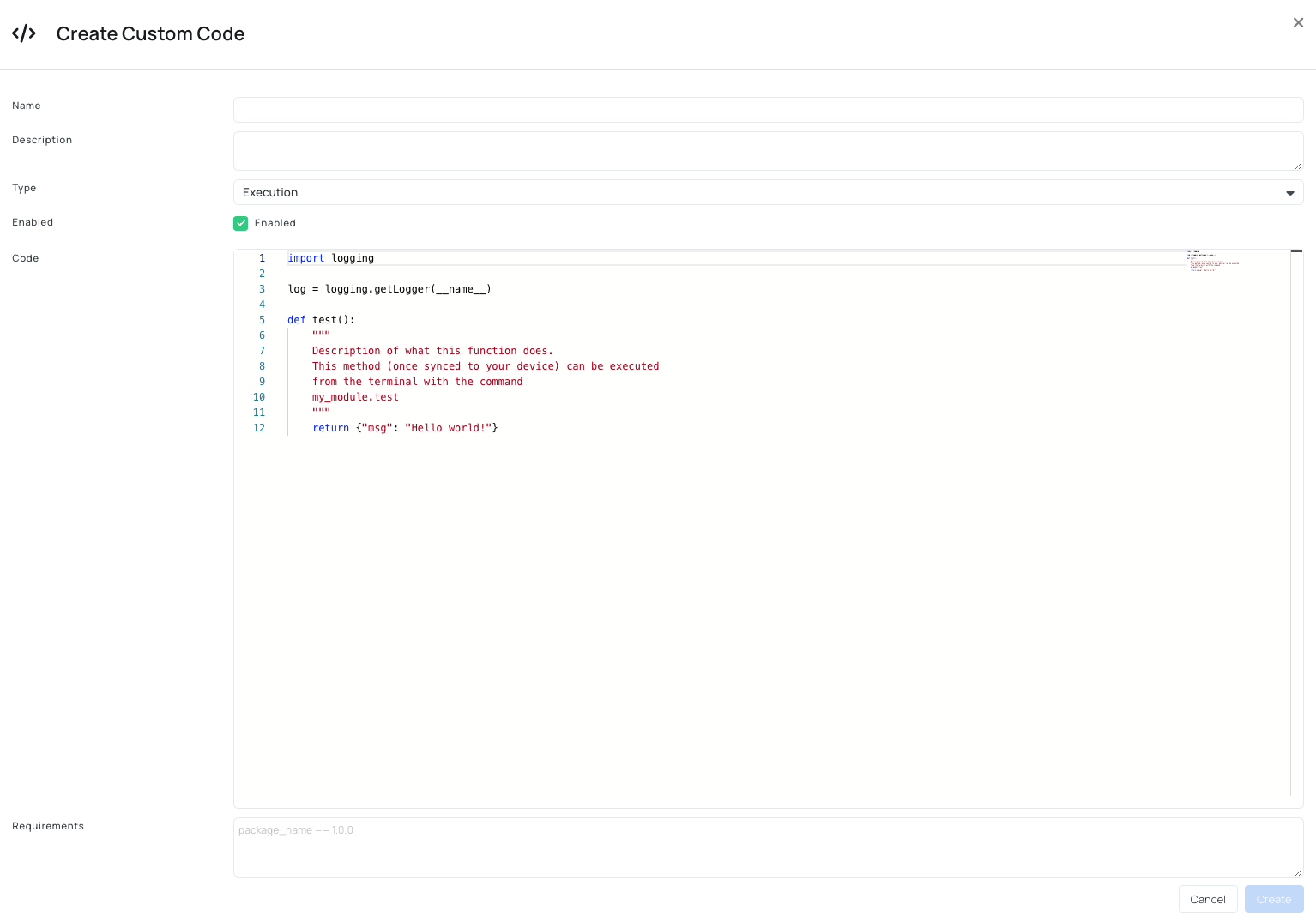
If the device is offline, the changes remain pending and synchronize the next time the device wakes up and reconnects. If the device is already online when you save a change, manually sync the device or restart it to apply the change immediately. Otherwise, the pending change is applied the next time the device wakes up.
The code editor uses Monaco on desktop and a plain text area on mobile. When working from a device page, the module is assigned to that device. When working from a template page, it is assigned to the template instead.
Example: execution module
Create an Execution module named my_module with the following code:
import logging

log = logging.getLogger(__name__)


def log_message():
    log.info("Custom code executed successfully")
    return {"success": True}
After saving and syncing the module, call it from the AutoPi Cloud terminal:
my_module.log_message
The same function can be called from jobs, hooks, triggers, services, or other custom modules.
Example: service module
A Service module runs continuously in the background. Its start() function receives the service settings as keyword arguments:
import logging
import time

log = logging.getLogger(__name__)


def start(**settings):
    interval = settings.get("interval", 5)
    log.info("Starting custom service")

    while True:
        log.info("Running background task")
        time.sleep(interval)
Avoid tight loops in a service. Always include an appropriate delay or another blocking mechanism to prevent unnecessary CPU usage.
Use custom code with AutoPi features
Custom modules can extend several parts of the AutoPi platform:
- Services and workers: process messages or perform background tasks. See Create Custom Services and Create Custom Workers.
- Hooks: receive, modify, filter, and return data within a service workflow. See Creating Custom Hooks.
- Triggers: react to data conditions, such as a speed threshold or a changed value. See Triggers.
- Returners: send the result of a workflow to the cloud or another destination. See Create Custom Returners.
- Terminal and jobs: call an Execution module directly by using its
module.functionname.
Pass settings to a module
Service settings are passed to start() as keyword arguments. For example, given these settings:
{
  "threshold": 50
}
Read the value in the module as follows:
def start(**settings):
    threshold = settings.get("threshold", 50)
Using a default value allows the module to continue working when the setting is not provided.
Add Python dependencies
Add external Python packages under Requirements, using one standard pip requirement per line:
requests==2.31.0
During synchronization, the device collects the requirements in /opt/autopi/salt/requirements.txt and installs them with pip. Keep dependencies pinned and minimal. Duplicate packages in the collected requirements are rejected.
What happens during synchronization
Selecting Sync runs the following command on the device:
state.sls pending
The device then:
- Downloads each enabled module.
- Writes the code to
/opt/autopi/salt/<type>s/<name>.py. - Installs the collected pip requirements.
- Reloads Salt so the changes take effect.
For example, an Execution module named my_module is written to /opt/autopi/salt/modules/my_module.py.
Salt uses these directories for custom code:
| Module type | Directory |
|---|---|
| Execution | /opt/autopi/salt/modules |
| Utility | /opt/autopi/salt/utils |
| Returner | /opt/autopi/salt/returners |
| Service | /opt/autopi/salt/engines |
Execution, Utility, and Returner modules trigger a module refresh. Service modules restart the Salt minion. Disabling or deleting a module removes its .py and .pyc files and triggers the same refresh or restart behavior.
Synchronizing a Service module restarts the Salt minion and can briefly interrupt device operations. Plan and verify the change accordingly.
Use Salt globals
Salt injects special globals into custom modules. The two most useful are __salt__ and __context__.
Call Salt functions with __salt__
__salt__ is a dictionary of loaded execution functions. Each key uses the format module.function:
result = __salt__["module.function"](*args, **kwargs)
Common examples include:
__salt__["cmd.run"]("vcgencmd measure_temp")
__salt__["cmd.run_all"]("ip link show can0")
__salt__["grains.get"]("master")
__salt__["file.read"]("/sys/class/thermal/thermal_zone0/temp")
__salt__["minionutil.run_job"]("state.sls", "some_state")
__salt__["minionutil.trigger_event"]("vehicle/12v/acceptable")
__salt__["event.fire"]({"key": "value"}, "my/custom/event")
__salt__["service.restart"]("salt-minion")
minionutil.trigger_event is the usual way to publish an event on the minion event bus. It wraps event.fire.
Cache temporary state with __context__
__context__ is a per-process dictionary that remains available between function calls in the same minion process. Use it to cache expensive objects or remember temporary state:
def get_decoder(decoder_name):
    if decoder_name not in __context__:
        __context__[decoder_name] = Decoder(decoder_name)

    return __context__[decoder_name]
The following example emits an event only when the battery state changes:
def battery12v_warning_event(result):
    state = __context__.get("envoy_battery_state")

    if result.get("value", 0) <= 11.9:
        if state != "needs_driven":
            __salt__["minionutil.trigger_event"]("vehicle/12v/needs_driven")
            __context__["envoy_battery_state"] = "needs_driven"
    elif state != "acceptable":
        __salt__["minionutil.trigger_event"]("vehicle/12v/acceptable")
        __context__["envoy_battery_state"] = "acceptable"
__context__ is not persistent storage. Its contents are lost when the minion restarts. To preserve a value across restarts, write it to a file or store it in Salt grains.
Work with managers and context
Managers, also called Salt engines, are long-running processes built around an event-driven message processor. Most managers have an Execution module with the same name. That module sends requests to the manager over the minion event bus and waits for a response.
A typical manager module follows this pattern:
from messaging import EventDrivenMessageClient, msg_pack as _msg_pack

__virtualname__ = "my_manager"

client = EventDrivenMessageClient(__virtualname__)


def query(*args, **kwargs):
    return client.send_sync(_msg_pack(*args, _handler="query", **kwargs))
Each manager stores runtime information in a named context dictionary. Unlike __context__, this is the manager's own state and can be inspected or updated through its manage function.
Inspect or update manager context
Run these commands from the device terminal, replacing <service> with the manager's module name:
# Read the complete context
<service>.manage context

# Read a nested key
<service>.manage context <key> [<nested_key>...]

# Set a value
<service>.manage context <key> value=<value>

# Read a value with a fallback
<service>.manage context <key> default=<fallback>
For example:
tracking.manage context position state
acc.manage context interrupt
obd.manage context is_obd_temporary_disabled value=true
Older modules may expose a dedicated .context() function. That function is deprecated and raises a DeprecationWarning. Use <service>.manage context instead.
Inspect manager components
The manage function also provides access to reactors, hooks, workers, and processor state:
<service>.manage insight

<service>.manage reactor list
<service>.manage reactor show <name>

<service>.manage hook list
<service>.manage hook call <name> [argument]... [<key>=<value>]...

<service>.manage worker list
<service>.manage worker show <name>
<service>.manage worker start <name>
<service>.manage worker pause <name>
<service>.manage worker resume <name>
<service>.manage worker kill <name>
Use reactor show * to inspect all registered reactors. The insight command returns the complete processor state, including context and reactors.
Expression keywords
Workers and reactors can use keyword expressions. The message processor resolves the following $ keywords:
| Keyword | Value |
|---|---|
$context | Manager context dictionary. |
$salt | Loaded __salt__ functions. |
$options | Minion options from __opts__. |
$event | Event currently being handled. |
$match | Regular expression match for the event tag. |
For example, a reactor action can call $salt["file.mkdir"](path) or use $context["cache.find"](...) in a condition.
Manager context reference
Each manager adds its configuration under context["settings"] and registers its hooks, workers, and reactors from the service settings. For more information about configuring services, see the Services guide. Worker state can include state, state_reason, loop_count, first_run_at, and last_run_at.
The following tables list the manager-specific keys available before the manager performs any work. Managers marked as empty add their keys at runtime.
Managers with reserved capabilities
| Manager | Initial context keys |
|---|---|
acc_manager | interrupt (total, timeout), buffer, readout |
audio_manager | mixer (settings, initialized), amplifier (enabled) |
cloud_manager | upload (count, complete) |
ec2x_manager | datetime, util, cache.get, cache.find, time (state) |
modem_manager | datetime, util, cache.get, cache.find |
event_reactor | cache.get, cache.find, result_cache.get |
obd_manager | battery (state, count, timer, event_thresholds, critical_limit, nominal_voltage), readout, monitor (count, readout with acc, avg, min, and max), export (state) |
spm_manager | state |
tracking_manager | position (state, error, last_recorded, last_reported) |
gnss_manager | Empty initially; populated at runtime. |
rfid_manager | authorized_tokens, login_context, authorized_token_regexes, keep_login_context |
Other managers
| Manager | Initial context keys |
|---|---|
ble_manager | Empty initially; populated at runtime. |
can_manager | Empty initially; populated at runtime. |
crypto_manager | state |
docker_monitor | newest_event_timestamp |
doip_manager | Empty initially; populated at runtime. |
key_fob_manager | pin_wires, action_history |
manager | Empty initially; populated at runtime. |
Command reference
Run these commands on the device through SSH or the AutoPi Cloud terminal.
Synchronize custom code
state.sls pending
Execute a function
<module>.<function> [argument]... [<key>=<value>]...
Examples:
obd.query ELM_VOLTAGE
tracking.position
rpi.temp_cpu
To call the same functions from Python custom code, use:
__salt__["<module>.<function>"](*args, **kwargs)
Recommended workflow
- Write a small, focused function and test it locally where possible.
- Create the appropriate module on the Custom Code page.
- Add only the dependencies the module requires.
- Save and sync the module to the device.
- Test an Execution module directly from the terminal.
- Integrate the function into jobs, services, workers, hooks, or triggers.
- Monitor the device logs and refine the implementation.
Use logging instead of print statements, and keep blocking operations inside Service modules. Treat __context__ as a cache rather than durable storage.
Troubleshooting
Module does not run
- Confirm that the module is enabled.
- Sync pending changes.
- Confirm that the device is online.
- For a Service module, verify that the corresponding service is configured and running.
- Check whether the module name conflicts with a built-in or importable module.
Import fails
- Confirm that each dependency uses valid pip requirement syntax.
- Check for duplicate package entries.
- Pin compatible package versions.
- Sync again and review the installation logs.
Device uses excessive CPU
- Add a delay or blocking operation to continuous loops.
- Move long-running work from an Execution module to a Service module.
- Reduce the frequency or amount of data processed by workers and triggers.
State disappears after a restart
Values in __context__ and runtime manager context are process state. Store durable values in a file or Salt grains instead.
 Shop AutoPi devices
 Compare devices
 Contact sales
 Contact support