Introduction
This guide provides detailed instructions for configuring advanced settings on your AutoPi Mini device. You will learn how to optimize communication with your vehicle's diagnostic systems, manage vehicle identification, and configure ignition and tracking detection to match your specific vehicle type. These settings are essential for ensuring accurate data collection and reliable device operation.
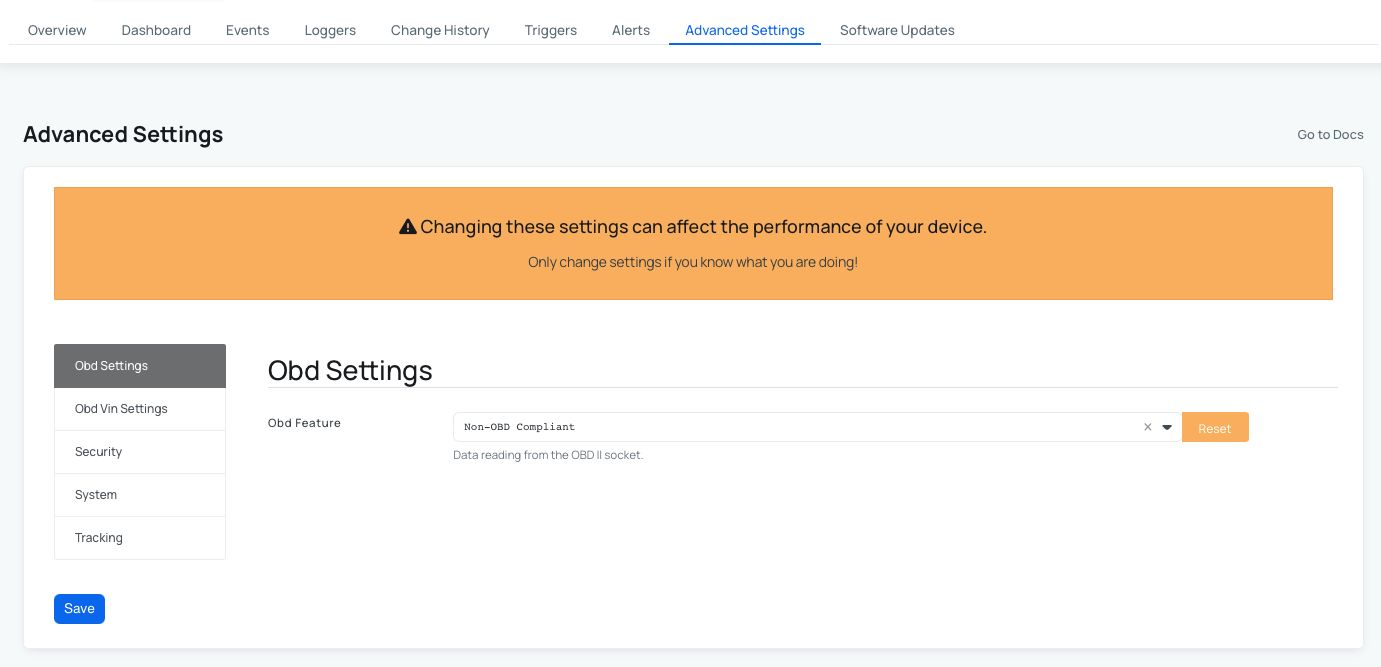
In this guide, you will:
- Configure OBD (On-Board Diagnostics) communication settings for your vehicle type.
- Set up vehicle identification (VIN) to uniquely identify your vehicle.
- Choose the appropriate ignition detection method for your vehicle.
- Select the vehicle tracking and trip detection data source.
Like any AutoPi Cloud functionality, configuration settings can be changed programmatically through the AutoPi REST API. For more information see our API docs page.
OBD Settings
The OBD Feature setting determines how your AutoPi Mini device communicates with your vehicle's onboard diagnostics system.
| Setting | Description | Default |
|---|---|---|
| OBD Feature | Determines the communication protocol used to access vehicle diagnostics. Select OBD (Auto) for internal combustion engine (ICE) vehicles or Non-OBD Compliant for electric vehicles (EVs). | OBD (Auto) |
Vehicle Identification (VIN) Settings
These settings are located under the OBD VIN Setting tab in Advanced Settings.
The VIN (Vehicle Identification Number) is a unique 17-character code that identifies your vehicle. These settings allow you to specify how the VIN is obtained for your vehicle record.
| Setting | Description | Default |
|---|---|---|
| VIN | The 17-character vehicle identification number. This is typically retrieved automatically from your vehicle's diagnostics system. If automatic detection fails, you can enter this manually. | — |
| VIN Source | Specifies whether the VIN is retrieved automatically from the vehicle (Auto) or entered manually (Manual). Select Manual if your device cannot automatically retrieve the VIN. | Auto |
Ignition Detection Settings
This setting is located under the System tab in Advanced Settings.
Ignition detection determines how the AutoPi Mini identifies whether your vehicle is running. This is important for accurate trip detection and data collection.
| Setting | Description | Default |
|---|---|---|
| Ignition Detection Method | Specifies the sensor or data source used to detect vehicle ignition status. For ICE vehicles, select Power Voltage or Engine RPM. For electric vehicles, select Accelerometer. | Power Voltage or Engine RPM |
Vehicle Tracking Settings
This setting is located under the Tracking tab in Advanced Settings.
The tracking setting determines which data source is used to detect when your vehicle is in use. This information is essential for trip logging and fleet management.
| Setting | Description | Default |
|---|---|---|
| Tracking Source | Determines the data source for detecting when your vehicle is being driven. Trip start/stop uses calculated trip events (viewable in Device > Events and Vehicle > Trips). Engine RPM monitors actual RPM values from your vehicle's engine. This setting only affects new data collected after the change is applied. | Trip start/stop |
Quick Setup for Electric Vehicles
If you have an electric vehicle or hybrid, follow these steps to optimize your AutoPi Mini configuration:
- OBD Feature: set to Non-OBD Compliant.
- VIN Source: select Manual.
- VIN: enter your vehicle's 17-character VIN code.
- Ignition Detection Method: select Accelerometer.
- Movement Start Delay: set between 5 to 12 seconds.
- Movement Stop Delay: set between 30 to 60 seconds.
After making these adjustments, verify your settings by checking the Change History tab to confirm they were applied successfully. For optimal performance, we recommend restarting the device remotely. If you need assistance with this step, please contact our support team at support@autopi.io.
 Shop AutoPi devices
 Compare devices
 Contact sales
 Contact support