Using the AutoPi With an External Power Supply


This guide will walk you through safely powering your AutoPi device using an external power supply through the OBD connector. This approach is ideal for development, testing, and troubleshooting scenarios where vehicle-based power is unavailable.
What you'll learn:
- How to correctly connect an external power supply to your AutoPi device.
- Power supply requirements and safety considerations.
- How to manage sleep timers and power states during bench testing.
- Best practices for lab and testing environments.
Common use cases:
- Configuration Validation — test settings and configurations before vehicle deployment.
- Issue Reproduction — reproduce and debug problems in a controlled environment.
- Development Testing — develop and test features without vehicle access.
- Firmware Testing — validate firmware updates and custom code.
Prerequisites:
- An AutoPi device (CM4, CAN-FD Pro, or Pro Casing models).
- An external power supply (13 V minimum, 2.5 A recommended).
- Basic understanding of power management and device safety.
- Optional: OBD-II power cable for easier connectivity.
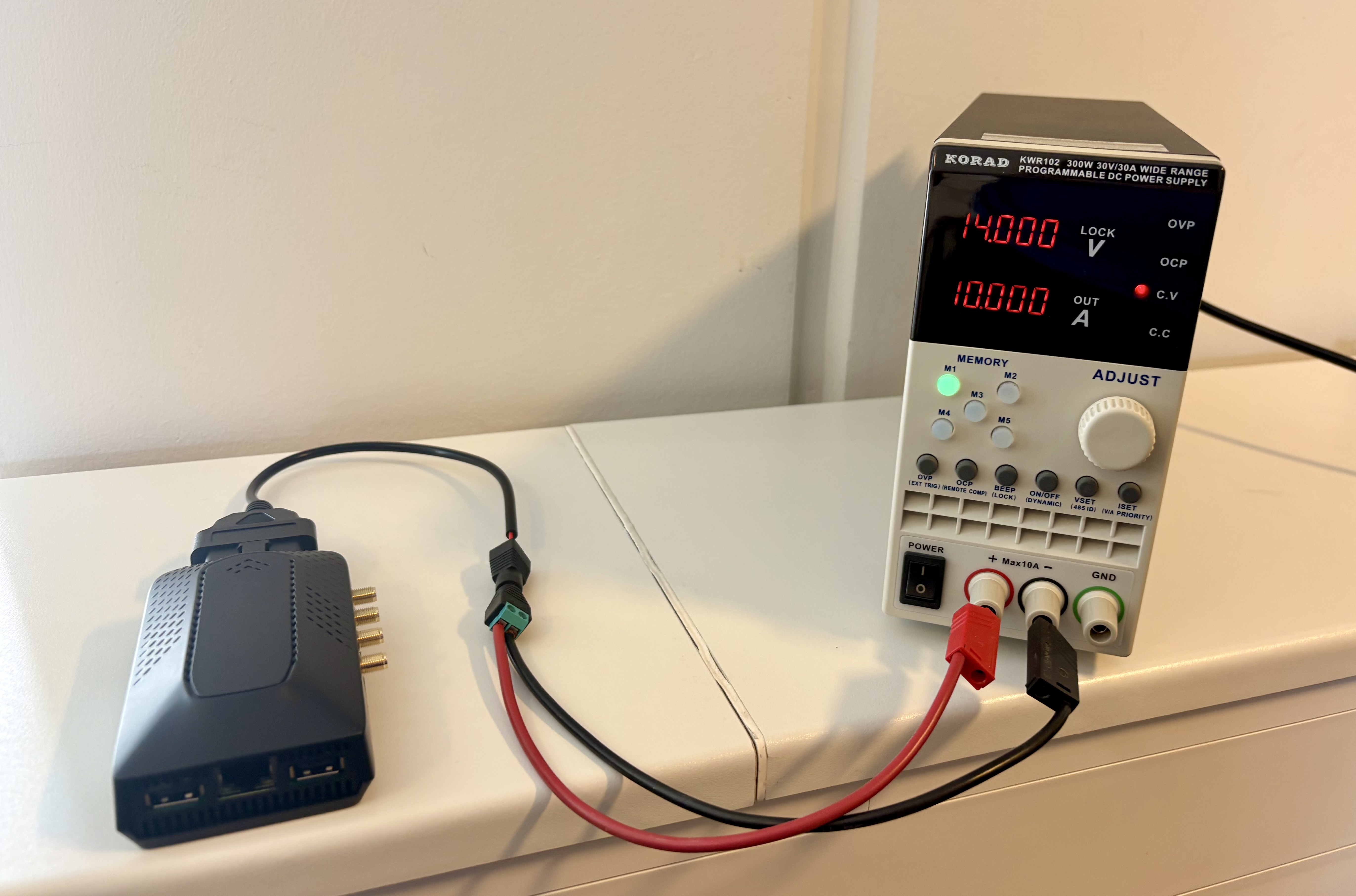
Using an external power supply is an excellent option when validating configurations, reproducing issues, and troubleshooting behavior outside a vehicle.
A variable power supply is recommended so that you can simulate engine stopped voltage level (less than ~12.8 V), and also engine running (more than ~13.3 V).
Setup Checklist
-
Always power the AutoPi through the OBD connector. Do not use the Raspberry Pi power inputs. This can cause AutoPi features to behave incorrectly and may damage the device.
-
Use a stable power source. AutoPi may power down automatically when voltage drops below 12.2 V to protect the vehicle battery. For lab use, provide at least 12.5 V and use a power supply rated for at least 2.5 A.
-
Be aware of sleep timer behavior. If no communication is detected on the vehicle CAN bus, a sleep timer may be triggered.
Useful Commands
You can run AutoPi Core commands either locally on the device or over SSH, read more here: How to SSH to Your Device.
- Local terminal format:
power.status. - SSH format:
autopi power.status.
The autopi prefix works for all AutoPi Core commands. See the commands documentation for a full reference.
Sleep Timer Commands
Sleep timers are power-management timers that can put the AutoPi into sleep mode when no expected activity (such as CAN bus communication) is detected for a period of time.
- To inspect sleep timers, run
power.sleep_timer. - To clear all timers, run
power.sleep_timer clear=*.
Read more in Power Sleep Timer Commands and the Sleep Timers Guide.
Recommended Cable
For an easier connection to an external power supply, we recommend the OBD power cable available in our shop: OBD-II Power Cable.
 Shop AutoPi devices
 Compare devices
 Contact sales
 Contact support