CAN Bridge Over the Internet


This guide explains how to create a CAN bridge over the Internet using AutoPi devices. It shows how two AutoPi Pro devices can be used to securely bridge a vehicle CAN bus to any third-party CAN based diagnostic tool, regardless of physical location.
Note: Make sure to contact our sales team at sales@autopi.io in order to have this new add-on "Remote CAN" enabled for your account.
A practical example of a remote CAN access setup is demonstrated in our YouTube video: AutoPi CAN Bridge over the Internet.
Overview
A CAN bridge over the Internet allows engineers and technicians to access a vehicle’s CAN bus remotely while still using their preferred local diagnostic or test tools. Instead of connecting directly to the vehicle, CAN traffic is transparently bridged between two AutoPi Pro devices over a secure Internet connection.
This approach is especially useful for:
- Remote diagnostics and troubleshooting.
- Development and testing with third-party CAN or OBD-II tools.
- Supporting vehicles in the field without on-site access.
- Working with mixed vehicle fleets and platforms.
What Is a CAN Bridge Over the Internet?
A CAN bridge over the Internet is a setup where CAN frames from a vehicle are forwarded in real time to a remote location, where they appear exactly as if the diagnostic tool were physically connected to the vehicle.
Traditionally, CAN or OBD-II diagnostics require:
- A physical connection to the vehicle.
- Local presence of a technician and test equipment.
With AutoPi, CAN traffic can instead be:
- Read directly from the vehicle CAN bus.
- Transmitted securely over the Internet.
- Exposed locally to a third-party CAN or OBD-II tool.
This makes it possible to perform diagnostics, analysis, and testing remotely, without changing existing workflows or tools.
Using AutoPi CAN-FD Pro for CAN Bridging
AutoPi CAN-FD Pro devices combine native CAN access with cloud connectivity, making them well suited for Internet-based CAN bridging.
The main concept is simple:
- One AutoPi Pro connects to the vehicle acting as CAN master.
- A second AutoPi Pro connects to the technician’s tools acting as CAN slave.
- CAN traffic is bridged transparently between them.
Example Use Case: Secure CAN Bridge Over the Internet
Two AutoPi Pro devices are used to create a secure CAN bridge:
-
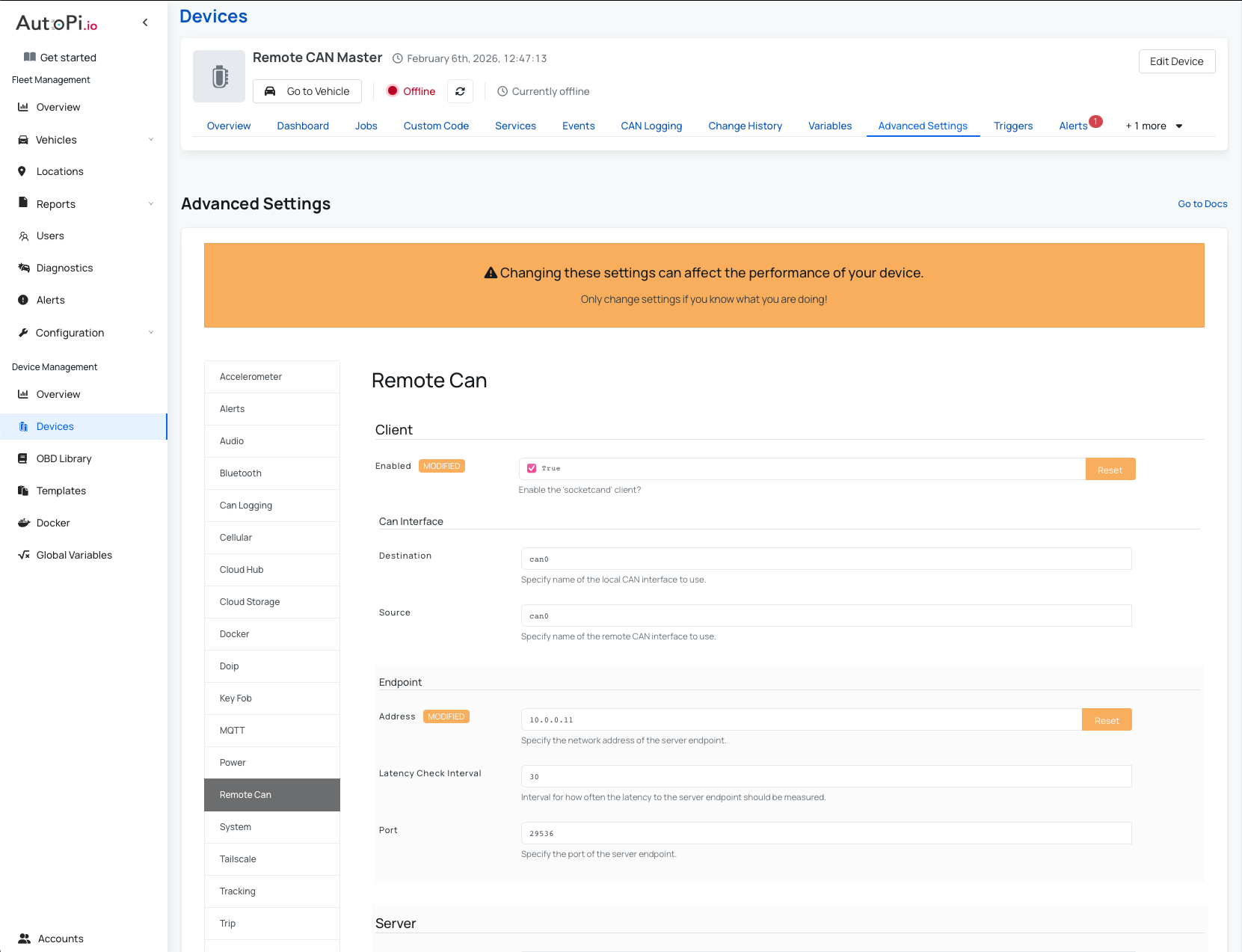
ON SIDE - AutoPi CAN-FD Pro as remote CAN master:
- Installed in the vehicle.
- Connected to the vehicle CAN bus.
- Reads/writes CAN data in real time.
-
REMOTE SIDE - AutoPi CAN-FD Pro as remote CAN slave:
- Located with the technician.
- Connected to any third-party CAN based diagnostic tool.
- Transmits/receives CAN frames from the vehicle and presents them locally as if directly connected to the vehicle.
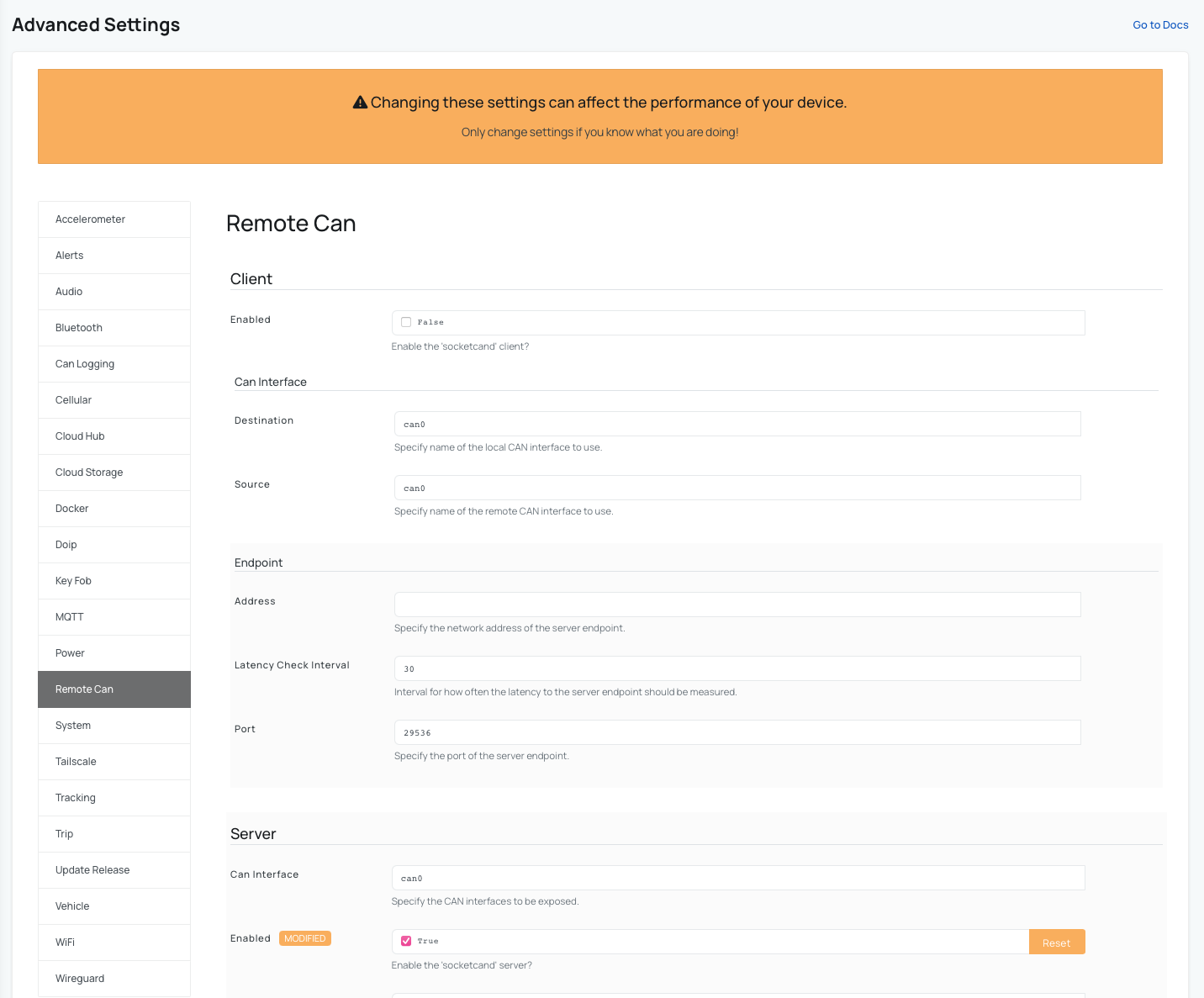
This setup allows technicians to use standard third-party tools such as OBD-II scan tools, CAN analyzers, diagnostic software, or custom test equipment without being physically near the vehicle.
Supported Vehicles and Protocols
While some CAN solutions focus only on passenger vehicles using OBD-II, AutoPi supports a much wider range of platforms. Thanks to AutoPi hardware and adapter options, a CAN bridge over the Internet can be used with:
- Passenger vehicles using OBD-II.
- Commercial and heavy-duty vehicles.
- J1939 based trucks and machinery.
- Other CAN-based vehicle and equipment platforms.
This flexibility makes AutoPi suitable for mixed fleets, industrial applications, and advanced automotive development scenarios.
Requirements
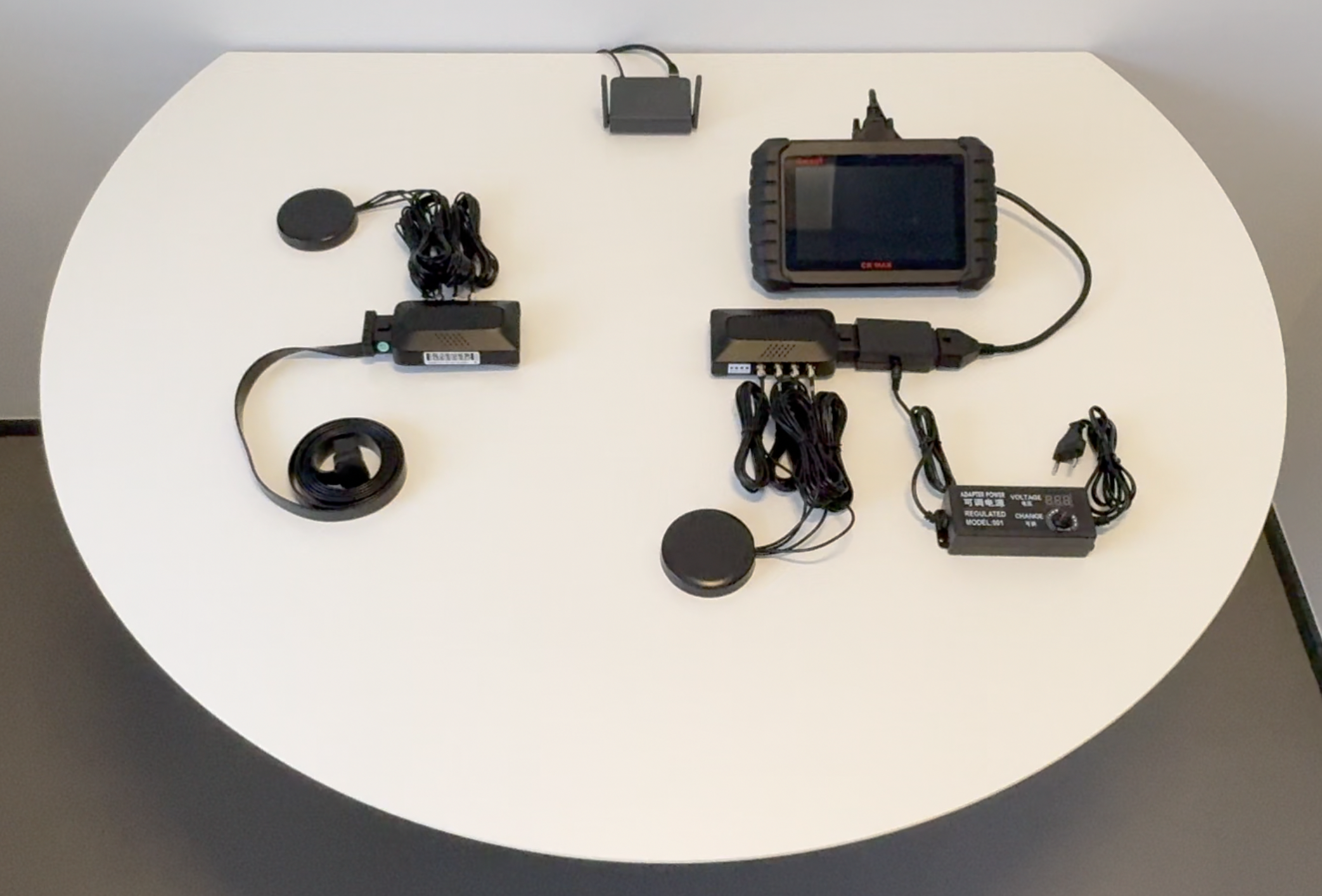
Before setting up a CAN bridge over the Internet, ensure you have:
- Two AutoPi CAN-FD Pro devices available on our Webshop.
- Internet connectivity for both AutoPi devices, we recommend using WiFi connection.
- Access to the AutoPi Cloud.
- A third-party CAN based diagnostic tool.
Device Configuration for CAN Bridging
To enable CAN bridging, both AutoPi CAN-FD Pro devices must be configured through the AutoPi Cloud.
Note: Exact configuration options depend on your use case and vehicle platform. The steps below describe the general approach. However, contact our support team for more information at support@autopi.io.
Configuration via AutoPi Cloud
Using AutoPi Cloud, you can:
- Enable and configure the CAN channels on each device.
- Set CAN bus parameters such as bitrate and interface selection.
- Define secure communication between the two AutoPi Pro devices.
- Control how CAN frames are forwarded or logged.
- Manage authentication and access permissions.
These settings allow you to fully control how CAN traffic is bridged, logged, or exposed to external tools.
Example CAN Bridge Setup and Demonstration
A practical example of a CAN bridge over the Internet is demonstrated in our YouTube video: AutoPi CAN Bridge over the Internet.
In the video, you can see:
- An AutoPi Pro connected to a vehicle and reading CAN data.
- CAN frames being transmitted securely over the Internet.
- A remote AutoPi Pro exposing the CAN bus to local diagnostic tools.
- Live vehicle data being read in real time.
The key takeaway is that CAN data can be accessed in real time from anywhere, while still using familiar third-party tools fully remotely.
Summary
A CAN bridge over the Internet with AutoPi devices enables secure, real-time access to vehicle CAN buses from anywhere in the world. By using two AutoPi Pro devices, you can:
- Bridge a vehicle CAN bus to a remote location.
- Use any third-party CAN based diagnostic tool.
- Support multiple vehicle types and CAN protocols, including J1939.
- Eliminate the need for physical access to vehicles.
This makes AutoPi a powerful solution for engineers, technicians, and fleet operators working with modern CAN-based systems.
Next Steps
- Watch the full YouTube demonstration to see the CAN bridge in action: AutoPi CAN Bridge over the Internet
- Explore AutoPi Cloud configuration options for CAN bridging.
- Adapt the setup for diagnostics, development, or fleet support use cases.
 Buy AutoPi device
 Compare all AutoPi devices
 Contact our sales team
 Contact our support team